

 See My Latest Article on HelloNation
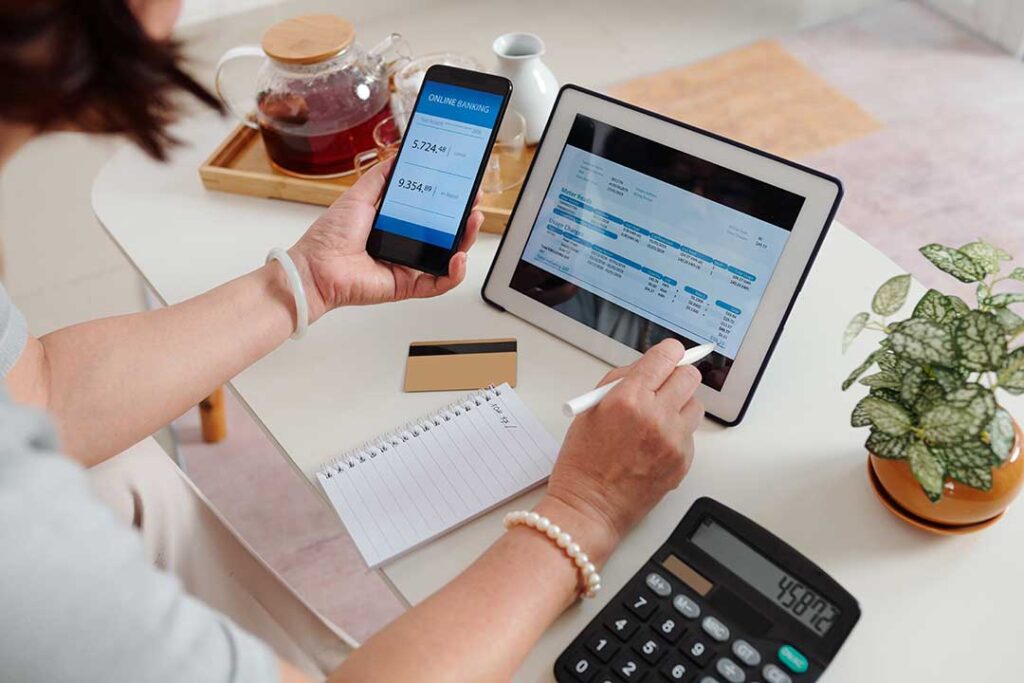
Banking apps have changed money management from a periodic task into something people can monitor throughout the day. Instead of waiting for a monthly statement or visiting a branch, account holders can review transactions, deposit checks, transfer funds, pay bills, and receive security alerts from a phone.
For residents of Purvis, MS, this can be especially useful when work schedules, weather conditions, transportation, or household responsibilities make in-person banking less convenient. The convenience is real, but banking apps work best when users understand their features, limitations, and security responsibilities.
What can banking apps do?
Banking apps typically provide many of the same basic services available through online banking, with added convenience for mobile devices. Common features include:
- Checking available and current balances
- Reviewing pending and completed transactions
- Depositing checks by taking photographs
- Transferring money between accounts
- Paying recurring or one-time bills
- Locking or unlocking a debit card
- Finding nearby ATMs
- Downloading statements and tax-related records
- Setting alerts for deposits, withdrawals, or low balances
The most useful change is faster access to information. A person can identify an unfamiliar debit-card purchase, notice a duplicate charge, or see whether a direct deposit has arrived without waiting for a paper statement. The Consumer Financial Protection Bureau recommends checking account activity and using alerts to identify errors or unauthorized transactions sooner. ([consumerfinance.gov](https://www.consumerfinance.gov/archive/blog/online-mobile-banking-tips-beginners/?utm_source=openai))
How do banking apps help with budgeting?
Banking apps make budgeting more immediate because spending appears close to the time it occurs. Some applications organize transactions into categories such as groceries, fuel, housing, utilities, or entertainment. This can help households compare actual spending with a planned monthly amount.
A practical approach is to review transactions once or twice each week rather than relying entirely on automatic categories. A purchase may be classified incorrectly, and a pending transaction may not reflect the final amount. Restaurant tips, fuel-station holds, rental deposits, and certain service charges can change after a transaction first appears.
Alerts can also support day-to-day planning. Useful settings may include:
- A warning when the checking balance falls below a chosen amount
- A notification when a purchase exceeds a selected dollar limit
- An alert when a direct deposit is received
- A reminder for an upcoming bill
- A notice when a transfer or withdrawal is completed
These tools do not replace a written budget, but they can make it easier to catch problems before they affect rent, utilities, loan payments, or other essential expenses.
Are mobile deposits available immediately?
A mobile check deposit is convenient, but the money may not be available for immediate use. Banks generally place holds on some deposits, and the timing can depend on the type of check, the account history, the amount, and the institution’s funds-availability policy.
The balance shown in an app may also include pending deposits or transactions that have not fully cleared. Before using deposited funds for an important payment, review the app’s available balance and the institution’s stated availability terms. The CFPB notes that pending transactions and deposits may not represent the final amount or the funds currently available for withdrawal. ([consumerfinance.gov](https://www.consumerfinance.gov/archive/blog/online-mobile-banking-tips-beginners/?utm_source=openai))
After submitting a mobile deposit, keep the paper check in a secure place until the deposit has been confirmed and any required holding period has passed. Follow the instructions provided by the financial institution for marking or disposing of the check.
How can people protect banking apps from scams?
The safest habit is to open the app directly rather than clicking a banking link in an unexpected text message or email. Fraudsters commonly send messages claiming that a suspicious charge occurred or that an account must be verified immediately. The message may direct the recipient to a counterfeit login page designed to collect passwords, account numbers, or security codes.
The Federal Trade Commission recommends contacting a financial institution through a phone number or website known to be legitimate instead of using information supplied in a suspicious message. Multi-factor authentication can also make it harder for someone to access an account with only a stolen username and password. ([consumer.ftc.gov](https://consumer.ftc.gov/articles/how-recognize-avoid-phishing-scams?utm_source=openai))
Other precautions include:
- Downloading an app through the financial institution’s official website or a recognized app store
- Checking the app’s developer name before installing it
- Using a unique password that is not reused for email or social media
- Enabling fingerprint, facial recognition, or a separate app passcode when available
- Keeping the phone’s operating system and security software updated
- Avoiding account access over unsecured public Wi-Fi
- Turning on transaction alerts
- Never sharing a one-time verification code with someone who calls unexpectedly
A legitimate bank employee should not need a customer to read back a security code to “stop” a fraudulent transaction.
Are banking apps and payment apps the same thing?
No. A banking app is generally provided by a bank or credit union for managing an account held with that institution. A payment app may be operated by a separate technology company and may allow users to send money, receive payments, or store a balance.
The difference matters because deposit insurance depends on where funds are actually held. The FDIC states that nonbank technology companies are not themselves FDIC-insured. When a nonbank app claims that funds may be connected to an insured bank, users should identify the specific bank and understand the applicable terms rather than assuming every balance has the same protection. ([fdic.gov](https://www.fdic.gov/consumer-resource-center/2024-06/banking-third-party-apps?utm_source=openai))
Before moving emergency savings or regular household funds into an unfamiliar app, review its ownership, dispute process, fees, transfer limits, privacy practices, and deposit-insurance information.
What should someone do if a phone is lost?
A lost phone does not automatically mean a bank account has been compromised, particularly when the device has a screen lock and the banking app requires an additional sign-in. Still, quick action is wise.
Use another trusted device to change the banking password, notify the financial institution, and suspend mobile payment functions if necessary. Review recent transactions carefully and report anything unauthorized as soon as possible. The CFPB advises notifying the bank or payment provider if a phone containing a payment app is lost or stolen. ([consumerfinance.gov](https://www.consumerfinance.gov/consumer-tools/bank-accounts/watch-accounts-closely-when-card-data-is-hacked/?utm_source=openai))
A strong device passcode, automatic screen locking, and remote device-location or erasure features can reduce the risk of unauthorized access.
What are the limits of banking apps?
An app can show account information, but it cannot always explain why a transaction is pending, whether a deposit will clear, or how a dispute will be resolved. Internet outages, device problems, service interruptions, and incorrect account information can also delay transfers or payments.
Important financial records should not exist only inside an app. Save statements when needed, keep confirmation numbers for significant transfers, and maintain a small backup plan for essential payments if mobile access is temporarily unavailable. This can matter during severe weather, power interruptions, or unreliable connectivity.
Used carefully, banking apps give households more control over timing, visibility, and everyday decisions. Their greatest value is not simply the ability to move money from a phone; it is the ability to notice changes early and respond before a small problem becomes a larger financial disruption.